
What Is Bitrate? MP3 vs AAC and How It Affects Radio Streams
October 10, 2026 · Updated November 02, 2026
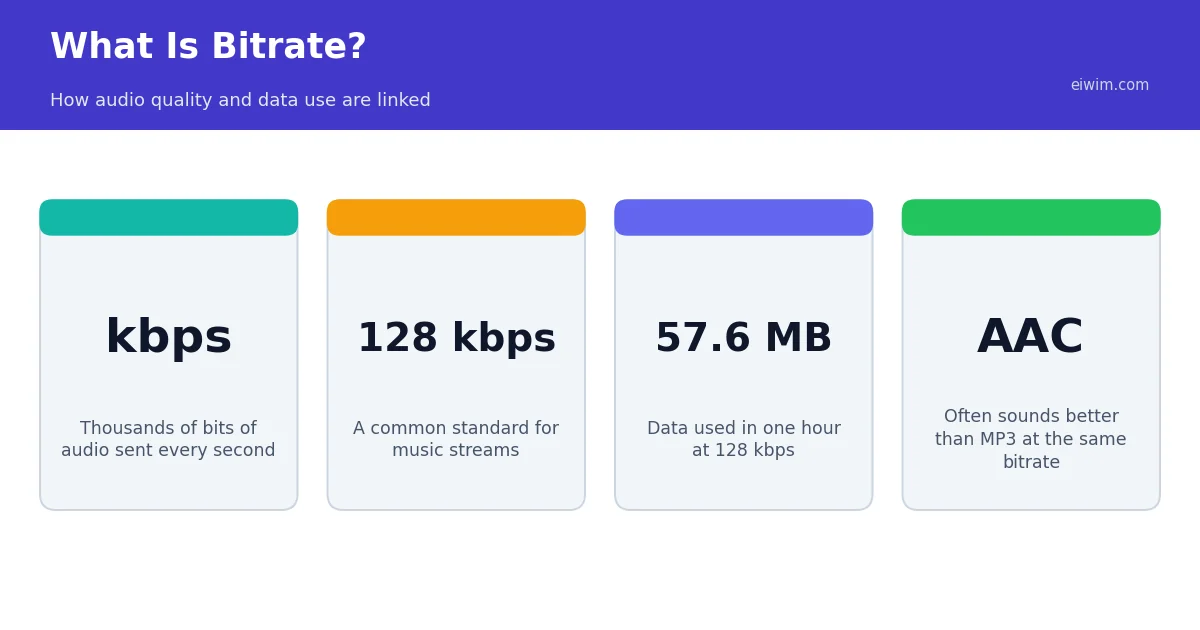
When an online radio station says it streams at 128 kbps, that number is the bitrate. Understanding it helps you choose streams that sound good without using more data than you need.
What bitrate means
Bitrate is the amount of audio data sent each second, measured in kilobits per second (kbps). A higher bitrate means more information about the sound, so the audio can be closer to the original. A lower bitrate saves data but removes detail.
What is a codec?
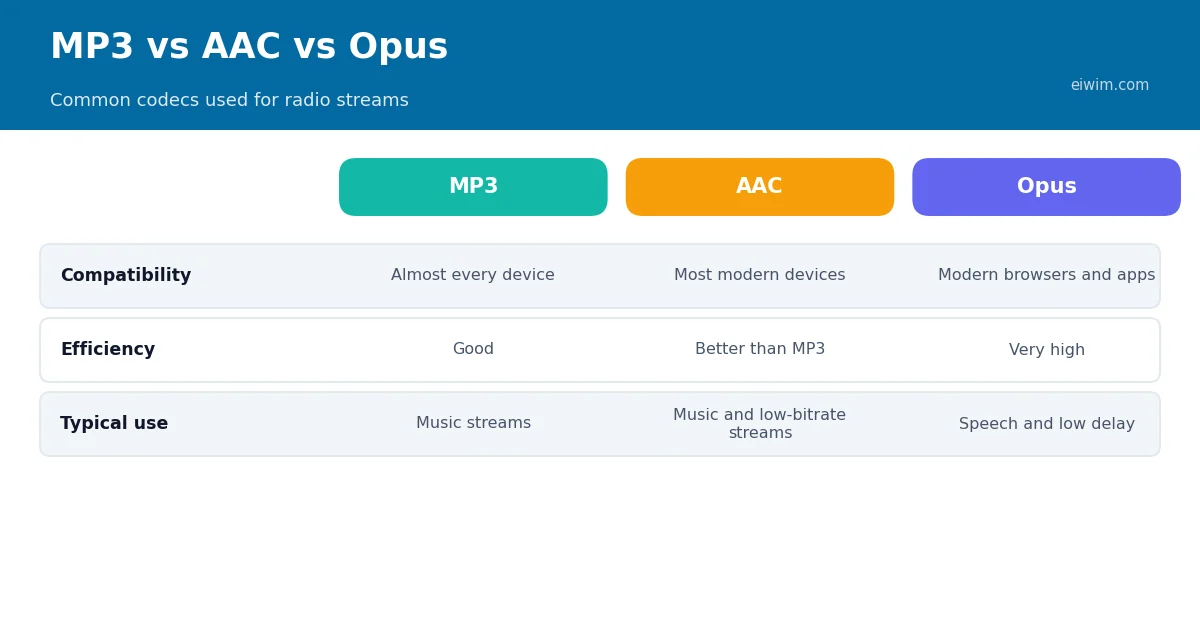
Audio is compressed before it is streamed, and the method used is called a codec. The three you will meet most often are MP3, AAC and Opus. MP3 is the oldest and works almost everywhere. AAC is generally more efficient, so at the same bitrate it usually sounds a little better. Opus is a modern open codec that performs well at low bitrates, particularly for speech.
What the numbers sound like
- 32 to 64 kbps: fine for talk radio and news. Music will sound thin, though efficient codecs such as AAC variants improve this.
- 96 to 128 kbps: a good balance for most music listening on phones and laptops.
- 192 to 320 kbps: high quality. Differences are most noticeable on good headphones or speakers.
How much data does it use?
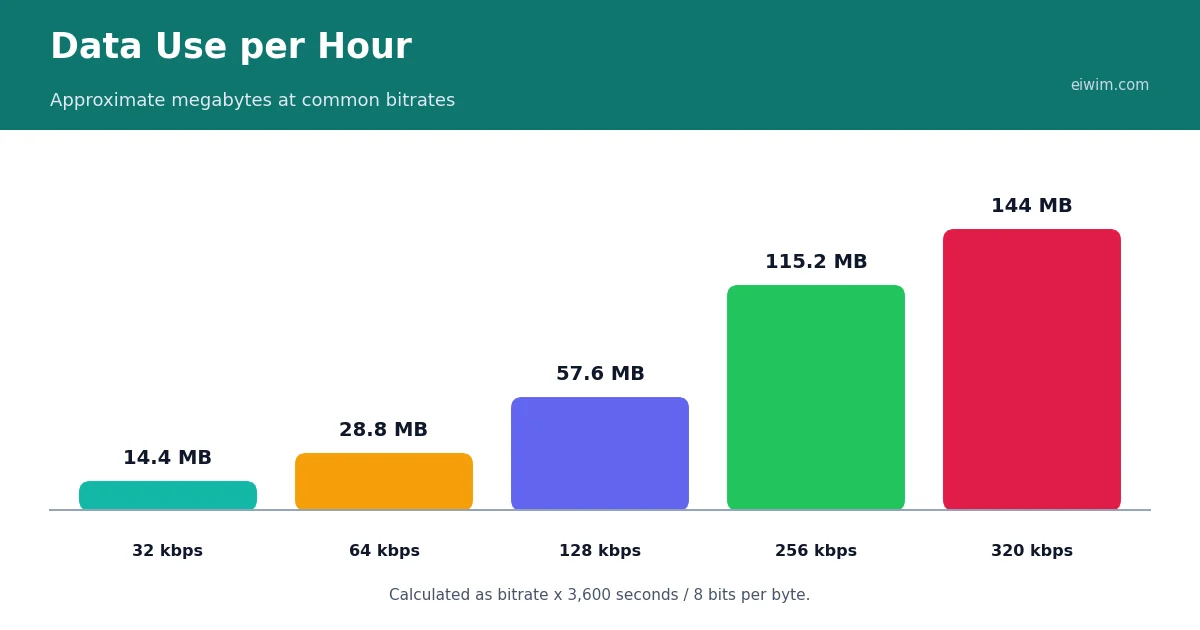
Data use is simple to calculate: multiply the bitrate by 3,600 seconds in an hour and divide by 8 to convert bits to bytes. A 128 kbps stream uses about 57.6 MB per hour, while 320 kbps uses about 144 MB.
Choosing the right stream
If you are on mobile data, a 64 kbps stream of a news station is a sensible choice. For music at home on Wi-Fi, pick a higher bitrate where the station offers one. The type of content matters too: if you mostly listen to spoken-word stations in the News-Talk or Talk categories, you rarely need more than 64 kbps. If you enjoy music, such as Jazz or Classical, higher quality is worth it.
If a stream keeps stopping because your connection cannot keep up, lowering the bitrate is one of the quickest fixes. See our checklist of fixes for streams that will not play for more ideas, and our audio quality tips for the other end of the scale.
Constant and variable bitrate
Bitrate can be fixed or flexible. With a constant bitrate, the stream uses the same amount of data every second, whether the music is simple or complex. This is predictable, which is why many live radio streams use it. With a variable bitrate, the encoder uses more data for complicated passages and less for simple ones, which can give better quality for the same average size. Live radio usually prefers constant bitrate because the stream has to be delivered in real time, and stations need to know how much bandwidth they will use. When a station states a bitrate, such as 128 kbps, it normally refers to this constant figure.
Sample rate and mono versus stereo
Two other settings affect size and sound. The sample rate describes how many times per second the audio is measured. A rate of 44.1 kHz is standard for music, while speech stations may use lower rates because speech does not need the highest frequencies. Mono or stereo is the second choice. A stereo stream carries two channels, which gives a sense of space for music but uses more data. Many talk stations broadcast in mono at a low bitrate, because a single voice does not benefit from stereo and the saving is useful. When you see a very low-bitrate stream, it is often a deliberate choice for speech rather than a poor-quality music stream.
Why stations compress so heavily
Bandwidth costs money. If a station streams at 128 kbps to a thousand listeners at once, it must send out around 128 megabits per second. Doubling the bitrate doubles that cost, and so stations choose a level that balances quality against their budget. This is one reason small and community stations often use lower bitrates, and why larger stations may offer several streams at different qualities. Newer formats such as HE-AAC help because they deliver acceptable quality at lower bitrates. If you want to know more about how stations fund themselves, read our guide to how radio stations make money.
How to check a stream's quality
You can often find the bitrate on the station's own page or in the station's description, and some players show it while the stream is playing. If it is not listed, a rough guide is to listen for signs of heavy compression: a "watery" sound on cymbals, a slightly muffled top end and a loss of detail when many instruments play together. Compare two streams of the same station if it offers both. Remember also that your equipment and listening environment affect what you hear. A noisy street or small phone speaker will hide differences that are obvious in a quiet room with good headphones. Our post on choosing speakers and headphones can help you get more from every stream.
A practical rule of thumb
If all this feels technical, you can use a simple rule. For talk and news, 48 to 64 kbps is plenty, and a mono stream is fine. For everyday music on a phone or laptop speaker, 96 to 128 kbps is a sensible middle. For headphones and good speakers, choose 128 kbps or higher when it is available. If you are on a limited mobile plan, drop one step. If your connection is slow and the stream keeps buffering, drop two. Most listeners find that these choices give clear audio without wasting data, and you can always switch if a station sounds thin.
Quick answers
Is a higher bitrate always better?
Not always. Beyond a certain point most listeners cannot hear a difference on ordinary equipment, and you simply use more data.
What bitrate is good for talk radio?
Around 48 to 64 kbps is usually fine for speech, especially with an efficient codec such as AAC.
Does the codec matter as much as the bitrate?
At low bitrates, yes. A more efficient codec such as AAC or Opus can sound better than MP3 at the same bitrate.